
Materials
Know what to take, and what you used
Before a job you write down what it will need. When it is done you record what you actually used, in one tap if it went to plan.

Try it
Write it the way you would say it
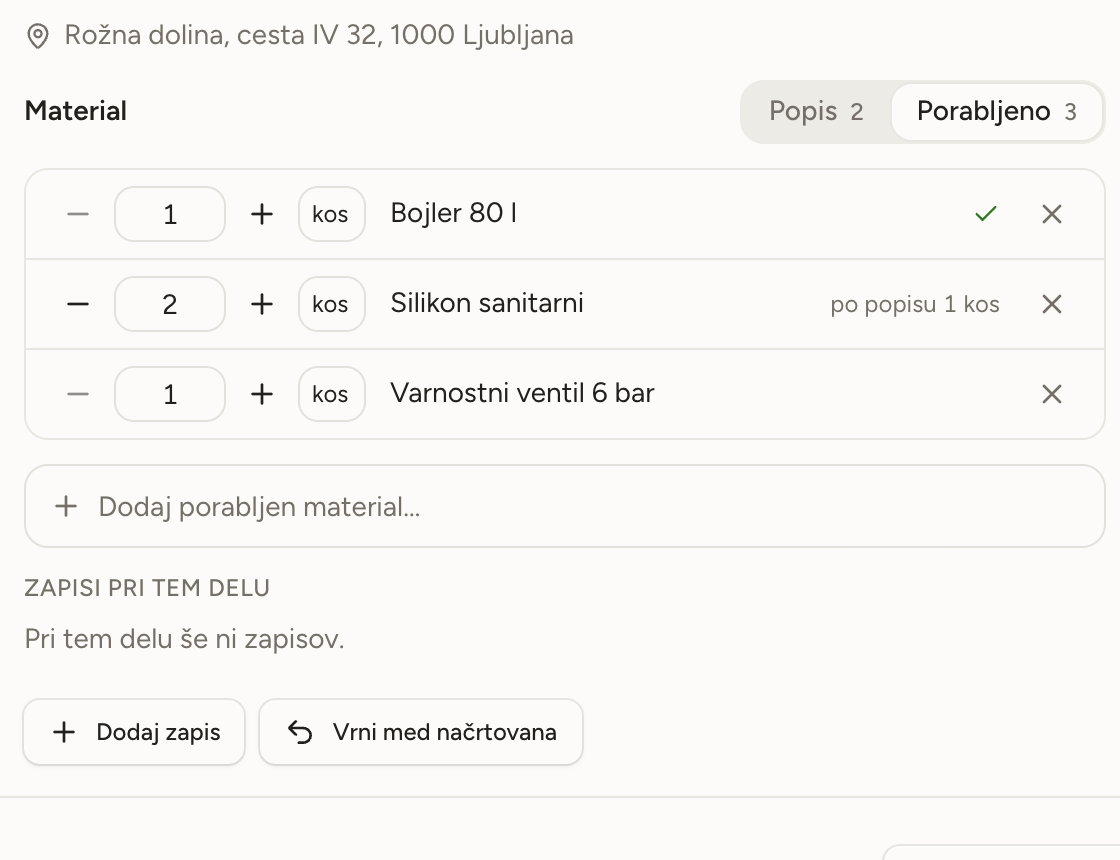
Quantity, unit and name on one line. After the job, one click copies the list across as used, and you correct what was different.
Material listVidmar – cylinder
Used
Nobody has recorded what this job used yet.
- A list on every job
- Open a job and write what it will need. Quantity and unit go on the same line, for example 5 m cable.
- It suggests what you already use
- The app offers the materials your workshop takes most often, before you type a single letter.
- New materials add themselves
- Type something that is not in your catalogue yet and it is added. There is nothing to set up in advance.
- What was used, in one tap
- When the job is done, press All as listed. Then correct only what was more or less, and add what was not on the list.
- Send the list on
- Copy the list and send it as a message to whoever is fetching the materials.
What you used, not what you planned
The list and what was used sit side by side on the job. Every line shows whether you used as much as you planned, and how much was on the list when it was different.
- Whatever matched the list is confirmed with one tap.
- Different units are never added together, so every amount stays exact.
- You can record what was used even in a cellar with no signal.
Team
The crew knows their day
Invite a colleague by email, hand them a job with a tap, and look at the day by person.
TeamOn site
Everything you need on the job
Today's plan, the customer's number and the route there are on your phone. Photos and notes save right away, even in a cellar with no signal.
On siteStart with next week
Open an account without a card, add your first customers and lay out the week.